
eDistrict UP: Certificate Application,
Login & Status Guide 2026
Apply for income, caste, domicile, birth, and death certificates. Register, login, check status, download, and verify — complete guide with fees, documents, and solutions.
Check Your Documents, Fees & Timeline — Before You Apply
Select your certificate type and application method. The tool shows exactly which documents you need, file size limits, fees, processing time, and common rejection reasons — so your form gets accepted first time.
Check Your Documents, Fees & Timeline — Before You Apply
Select your certificate type and application method to get a personalised checklist.
eDistrict UP — Document Checklist
📋 Documents You Need
💰 Fee Details
⏱️ Processing Timeline
⚠️ Avoid These Rejection Reasons
💡 Pro Tips
What is eDistrict UP? — Understanding the Portal
eDistrict UP is the Uttar Pradesh government's official online platform for citizen services. Through this single portal, any UP resident can apply for certificates, track applications, and download approved documents without visiting a tehsil or block office.
The platform covers all 75 districts with 325+ services from 47 government departments. It has processed over 36.90 crore certificates since its launch in December 2008 (source: Digital India Corporation/NeGD). The system is developed by the National Informatics Centre (NIC) UP State Unit at Yojna Bhawan, Lucknow, and runs under the National e-Governance Plan (NeGP). It received the Gems of Digital India Award (Analyst's Choice) in 2019 for excellence in e-Governance.
Note: If you previously used edistrict.up.nic.in — that was the old URL. It now redirects to edistrict.up.gov.in automatically.
eDistrict vs eSathi vs CSC — the difference people miss
eDistrict
is the backend system — the engine connecting all district offices. You don't interact with it directly.
eSathi
(eServices Access To Help Individuals) is the citizen portal at esathi.up.gov.in where you actually register, login, apply, and download. When people say "eDistrict UP login," they mean the eSathi citizen login.
CSC
(Jan Seva Kendra / Lokvani Kendra) are physical service centres where operators apply on your behalf. They use separate VLE credentials at eseva.csccloud.in — not your account. Read our CSC guide for fees, how to find one, and how to protect yourself from overcharging.
| eDistrict | eSathi | CSC | |
|---|---|---|---|
| What it is | Backend system | Citizen portal | Physical centre |
| Who uses it | Government officers | You (citizens) | Operators on your behalf |
| Cost per certificate | — | ₹10–15 | ₹30 + ₹30–50 facilitation |
Quick info
| Official portal | edistrict.up.gov.in |
| Citizen login | esathi.up.gov.in |
| Helpline | 0522-2304706 |
| ceghelpdesk@gmail.com | |
| Payment | PAYGOV (UPI, net banking, debit card) |
| DigiLocker | Integrated — certificates available in DigiLocker (digilocker.gov.in) |
| eSathi app | Android app removed from Play Store Aug 2024 — use web portal on mobile browser |
Last updated: August 2026
Certificate Fees — eSathi vs CSC (2026)
| Certificate | eSathi | CSC | Processing | Validity |
|---|---|---|---|---|
| Income (आय प्रमाण पत्र) | ₹10–15 | ₹30 + extra | 7–15 days | 3 years |
| Caste SC/ST (जाति) | ₹10–15 | ₹30 + extra | 7–15 days | Lifetime |
| Caste OBC NCL | ₹10–15 | ₹30 + extra | 7–15 days | 1–3 years |
| Domicile (निवास) | ₹10–15 | ₹30 + extra | 7–15 days | Lifetime |
| Birth (जन्म) | ₹10–15 | ₹30 + extra | 7–15 days | Permanent |
| Death (मृत्यु) | ₹10–15 | ₹30 + extra | 7–15 days | Permanent |
| Haisiyat (हैसियत) | ₹120 | ₹120 + extra | 15–21 days | 3 years |
| EWS | ₹10–15 | ₹30 + extra | 7–15 days | 1 financial year |
Fees may change — verify at edistrict.up.gov.in before applying. Processing depends on Lekhpal/Revenue Inspector field verification speed — active officers process in 3–5 days.
Certificates Available on eDistrict UP
Revenue Department
Urban Development / Panchayati Raj
Panchayati Raj
Each certificate has a dedicated guide page with complete documents, step-by-step process, rejection reasons, and FAQs.
How to Register and Login on eSathi
What you need before starting: A mobile number linked to your Aadhaar (mandatory for OTP), your Aadhaar number (for e-KYC auto-fill), and internet access. Chrome browser recommended.
Registration — step by step
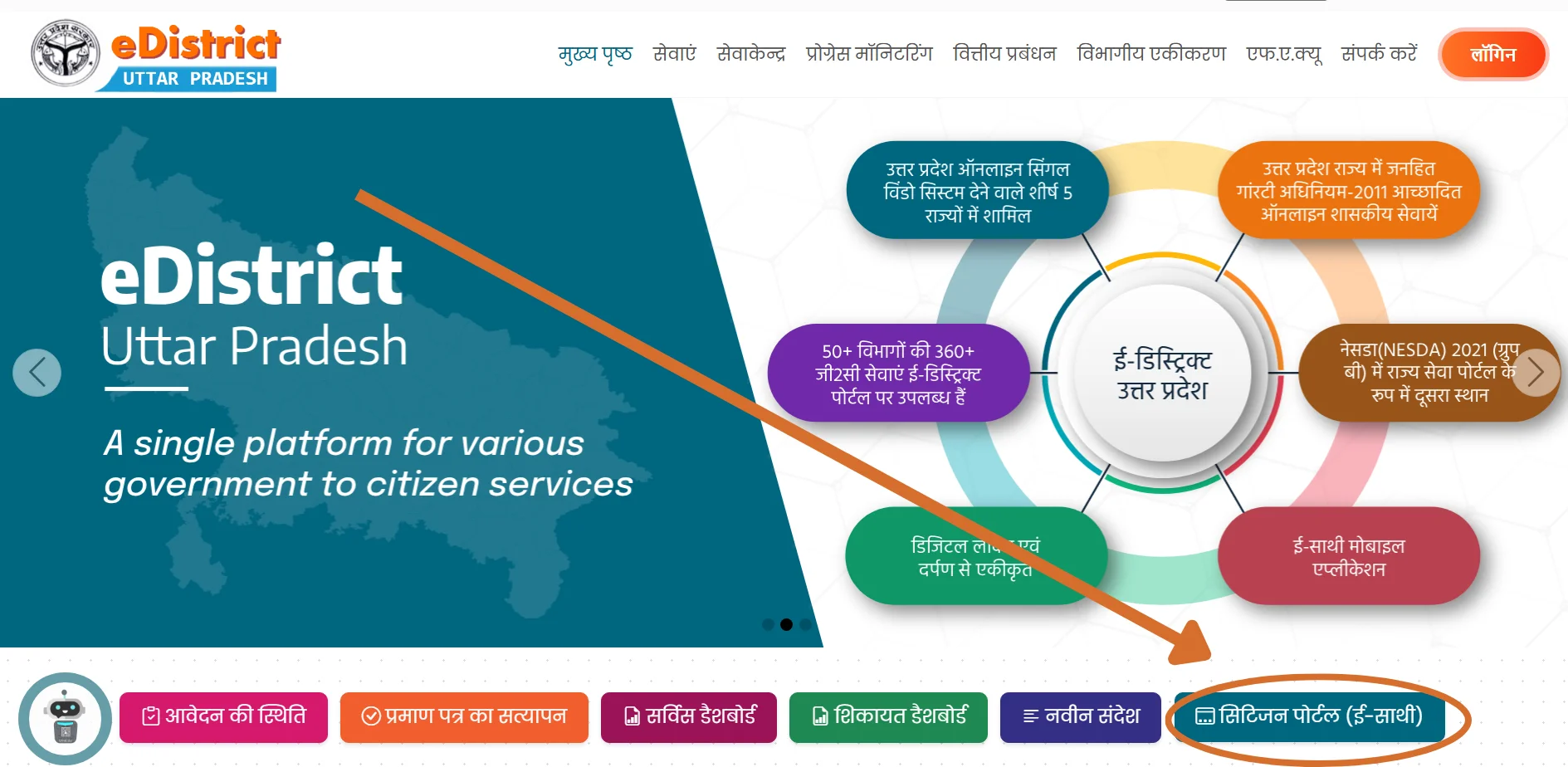
Go to edistrict.up.gov.in → click "Citizen Login (eSathi)" → redirects to esathi.up.gov.in. Or go directly to esathi.up.gov.in.
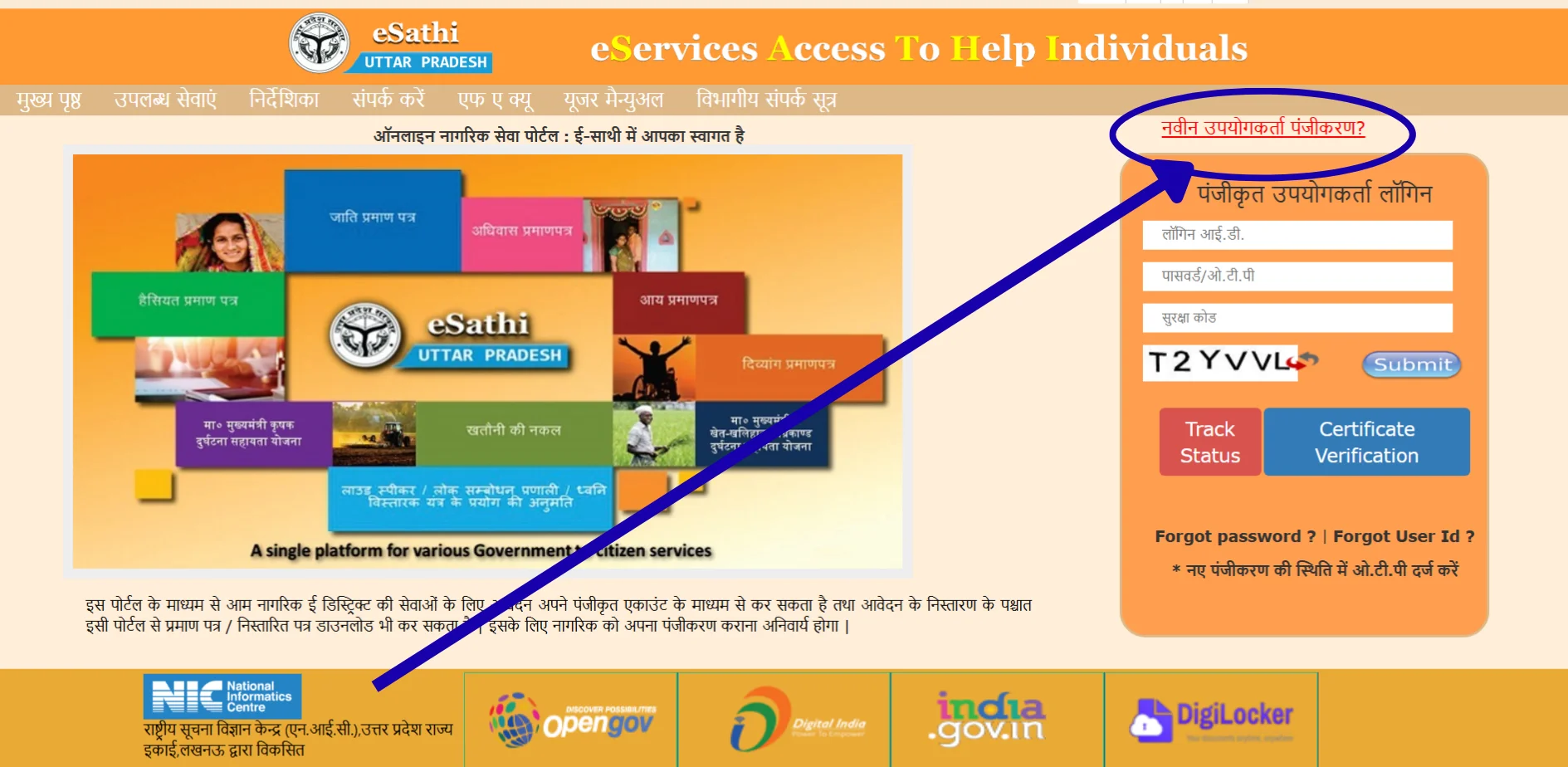
Click "नवीन उपयोगकर्ता पंजीकरण" (New User Registration).
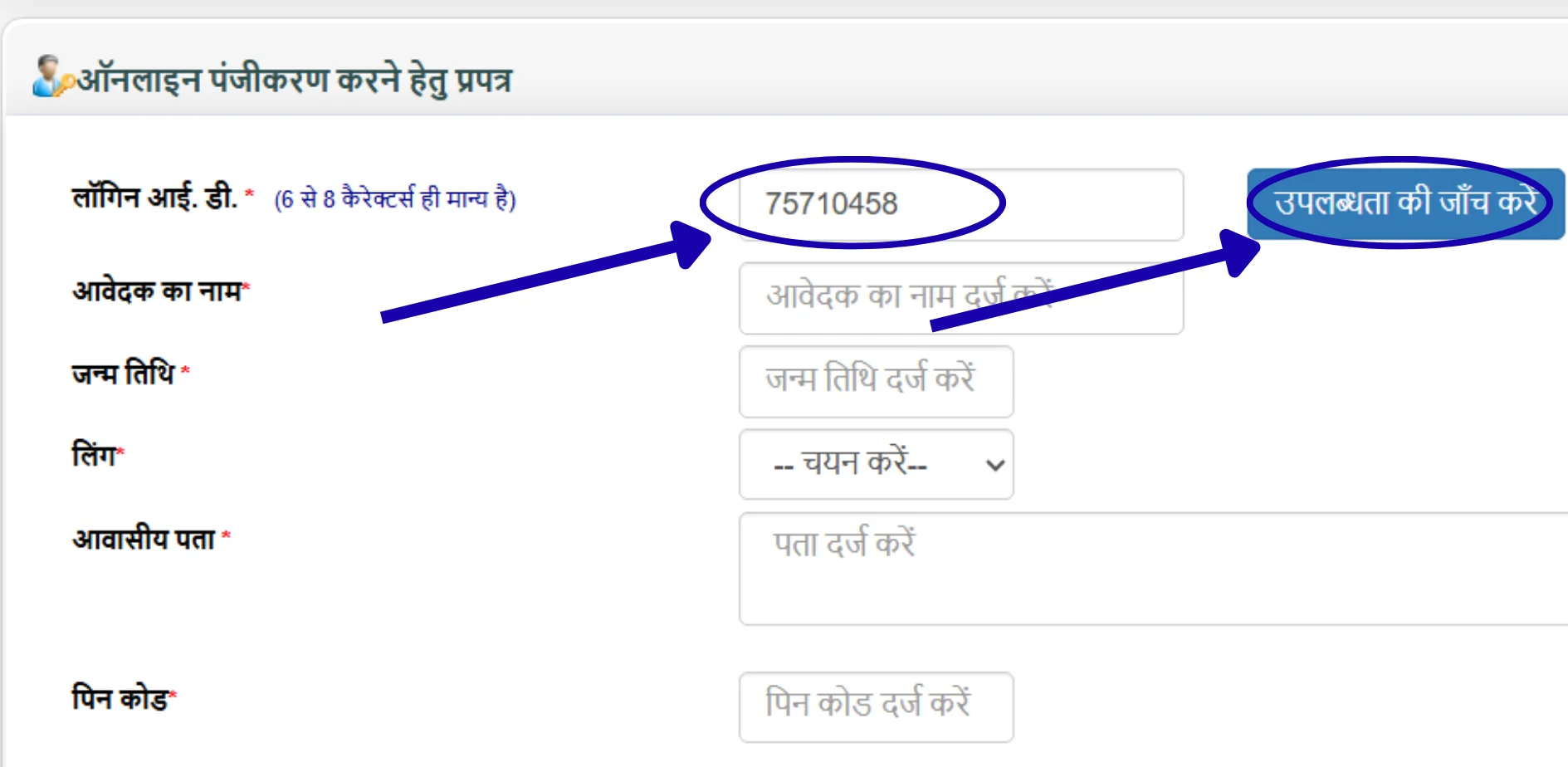
Create your Login ID — 6 to 8 characters, alphanumeric (like atul123, raj2026). Click "Check Availability" to confirm. Write it down — this is your permanent username, NOT your mobile number.
Fill details — name (exactly as on Aadhaar), date of birth, gender, address with PIN code, district, mobile number, email (optional).
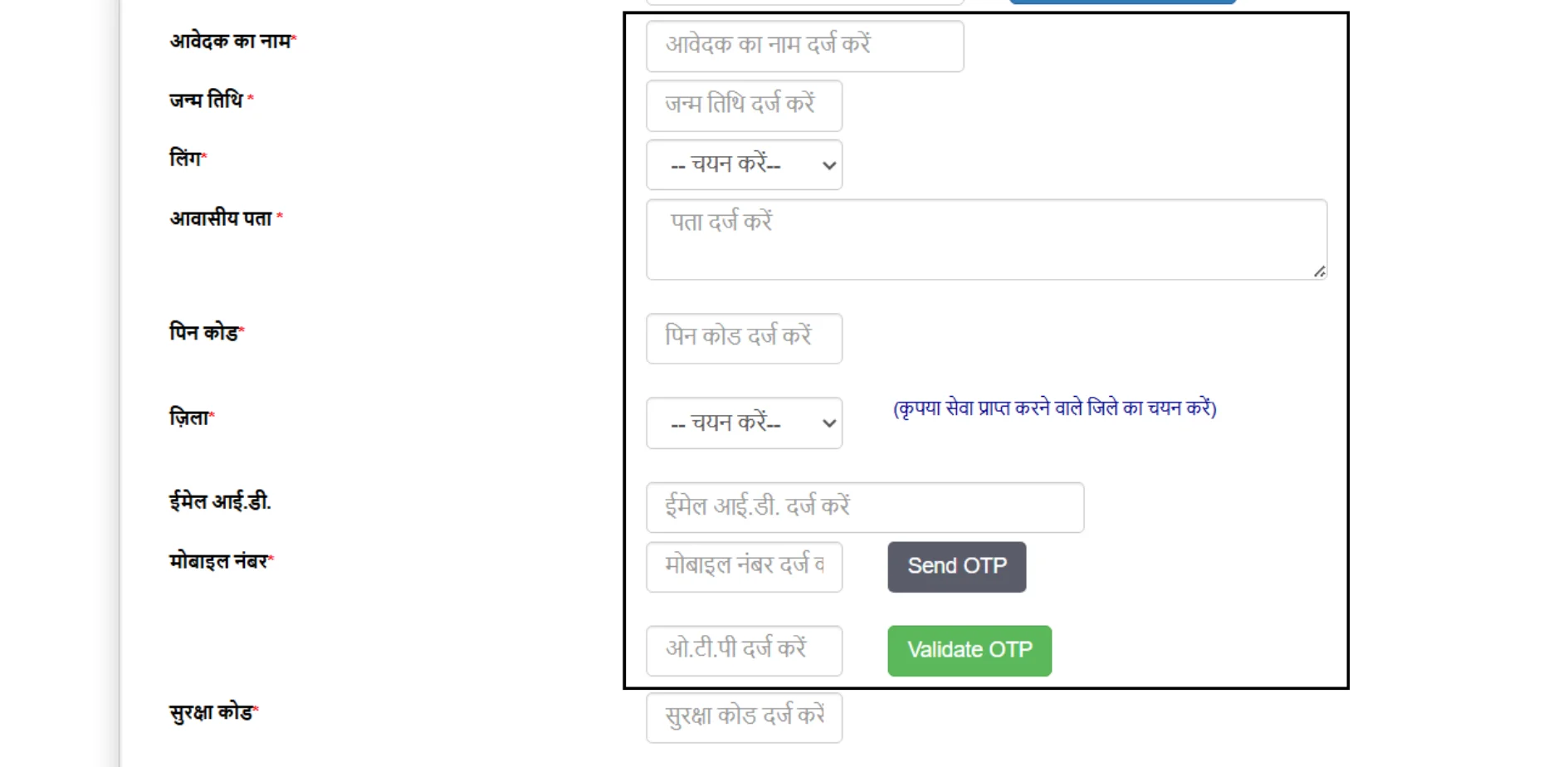
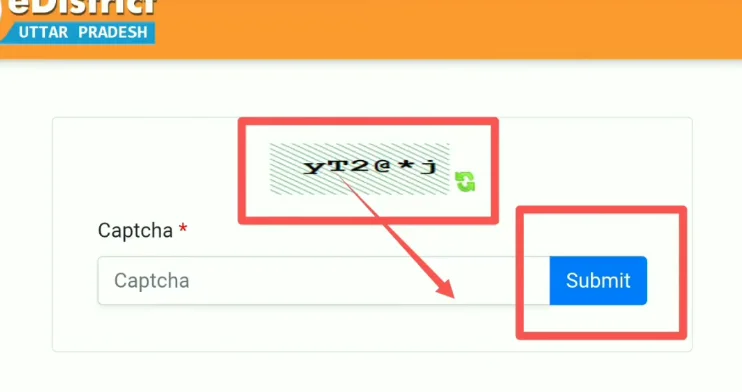
Enter captcha → click Save.
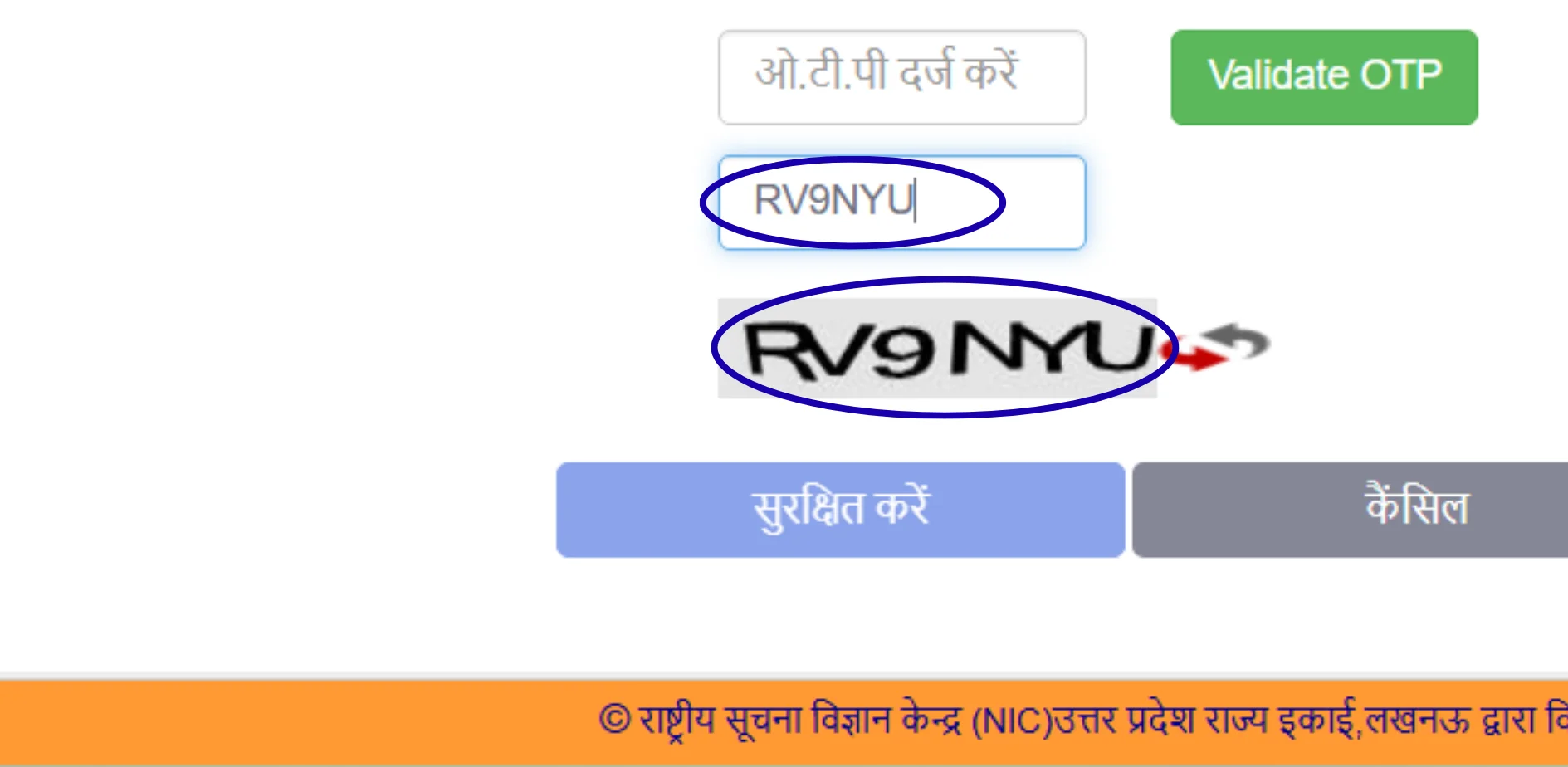
Complete Aadhaar OTP verification — OTP sent to your Aadhaar-linked mobile. Your name and photo auto-fill from Aadhaar.
First login: Use your Login ID + the OTP as temporary password. System prompts you to set a permanent password.
Done. Registration is free. You pay only when submitting a certificate application.
Login (after registration)
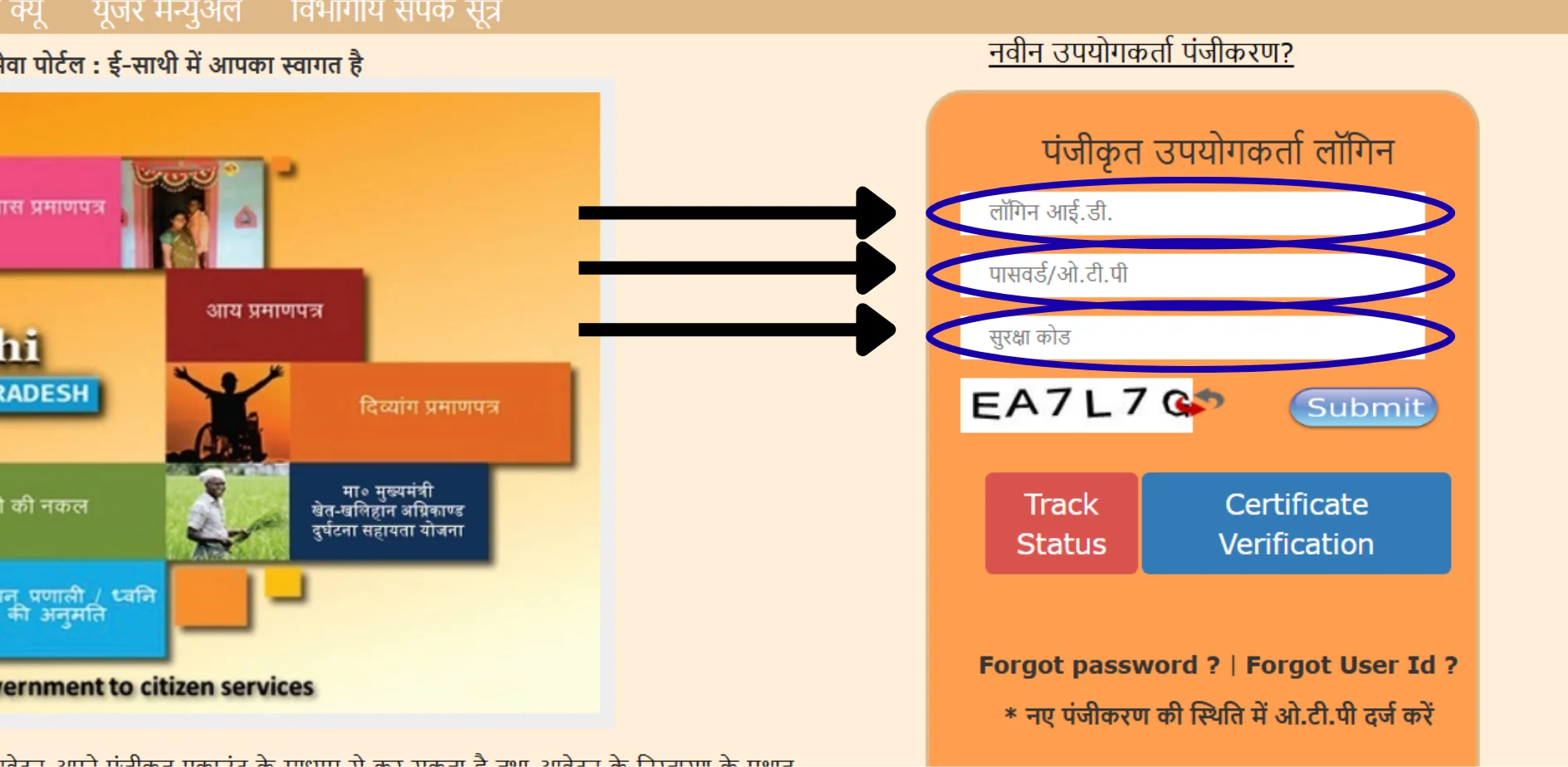
esathi.up.gov.in → Login ID + Password + Captcha → Submit → Dashboard.
Forgot Password
Login page → "Forgot Password" → Enter registered mobile → OTP → Set new password.
Forgot Login ID
Login page → "Forgot Login ID" → Enter registered mobile → ID sent via SMS. If your mobile number has changed, call helpline 0522-2304706 or email ceghelpdesk@gmail.com.
Three login types — know the difference
Citizen Login (eSathi)
what you use. URL: esathi.up.gov.in
CSC Operator Login
operators use their own VLE credentials at eseva.csccloud.in. Never share your eSathi credentials with a CSC operator.
Department Login
for Lekhpal, Tehsildar, SDM. Citizens never use this.
Common login errors
1"Login ID already exists"
Choose a different ID (try adding numbers like atul2026).
2OTP not received
Check Aadhaar-linked number is correct, wait 2–3 minutes (cooldown), check SMS spam folder, try early morning (6–8 AM) during peak seasons.
3Captcha failing
Clear cache, use Chrome, try incognito (Ctrl+Shift+N), disable ad-blockers.
4"Invalid Login ID or Password"
Login ID is your 6–8 char username, NOT mobile number. Check Caps Lock. Use "Forgot Password" if needed.
5"Mobile number already registered"
One account per number. Use "Forgot Login ID" to recover existing account.
6Portal not loading
Peak traffic during scholarship season (Jul–Sep). Try 6–8 AM or after 10 PM. Use Chrome.
7"Session expired"
Portal times out after 15–20 min inactivity. Have details ready, fill quickly.
How to Check Your Application Status
Without login (fastest)
Open edistrict.up.gov.in
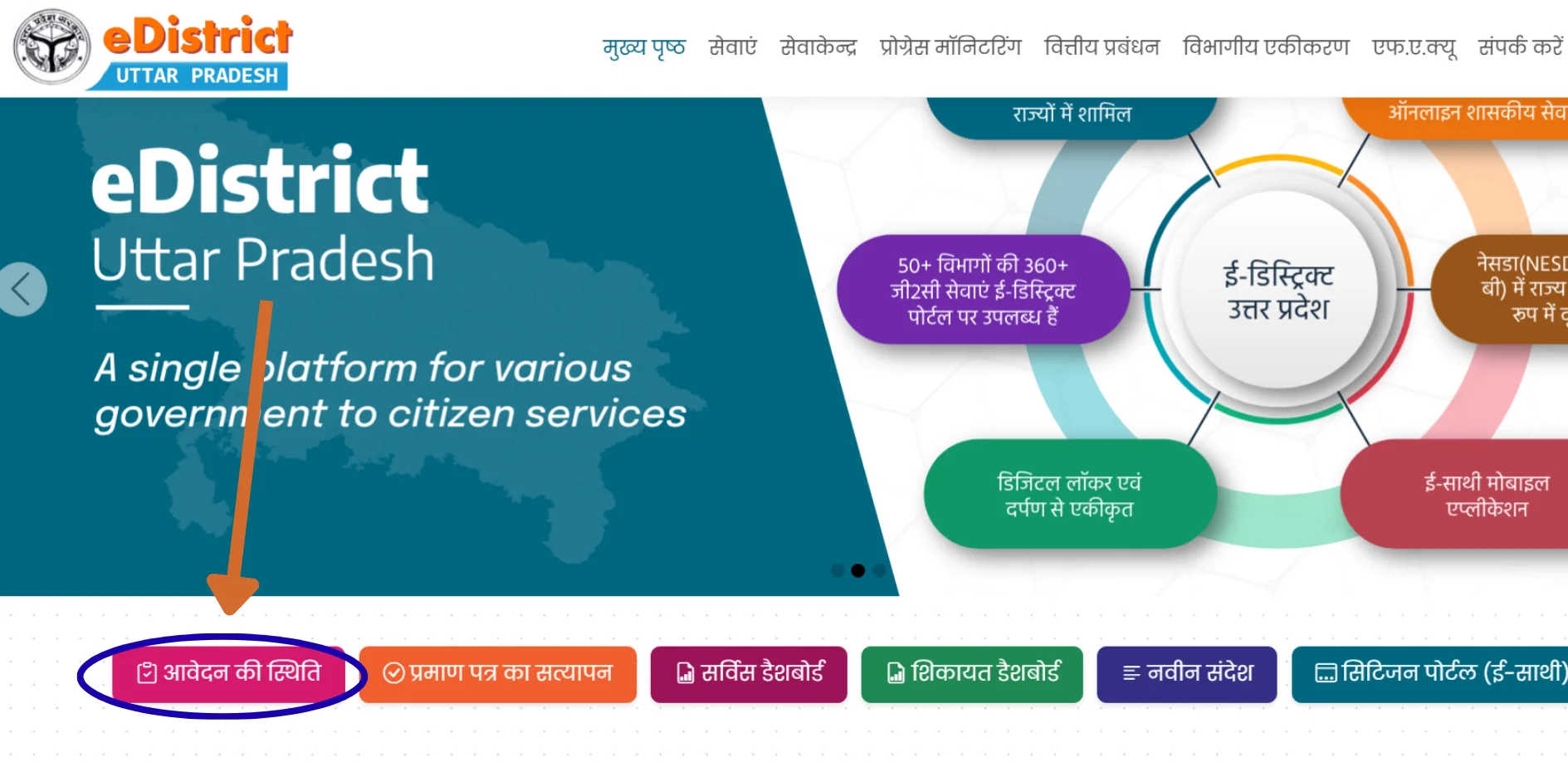
Click "आवेदन की स्थिति" (Application Status)
Enter your Service Request Number (SRN) — received via SMS at submission, also visible in eSathi dashboard
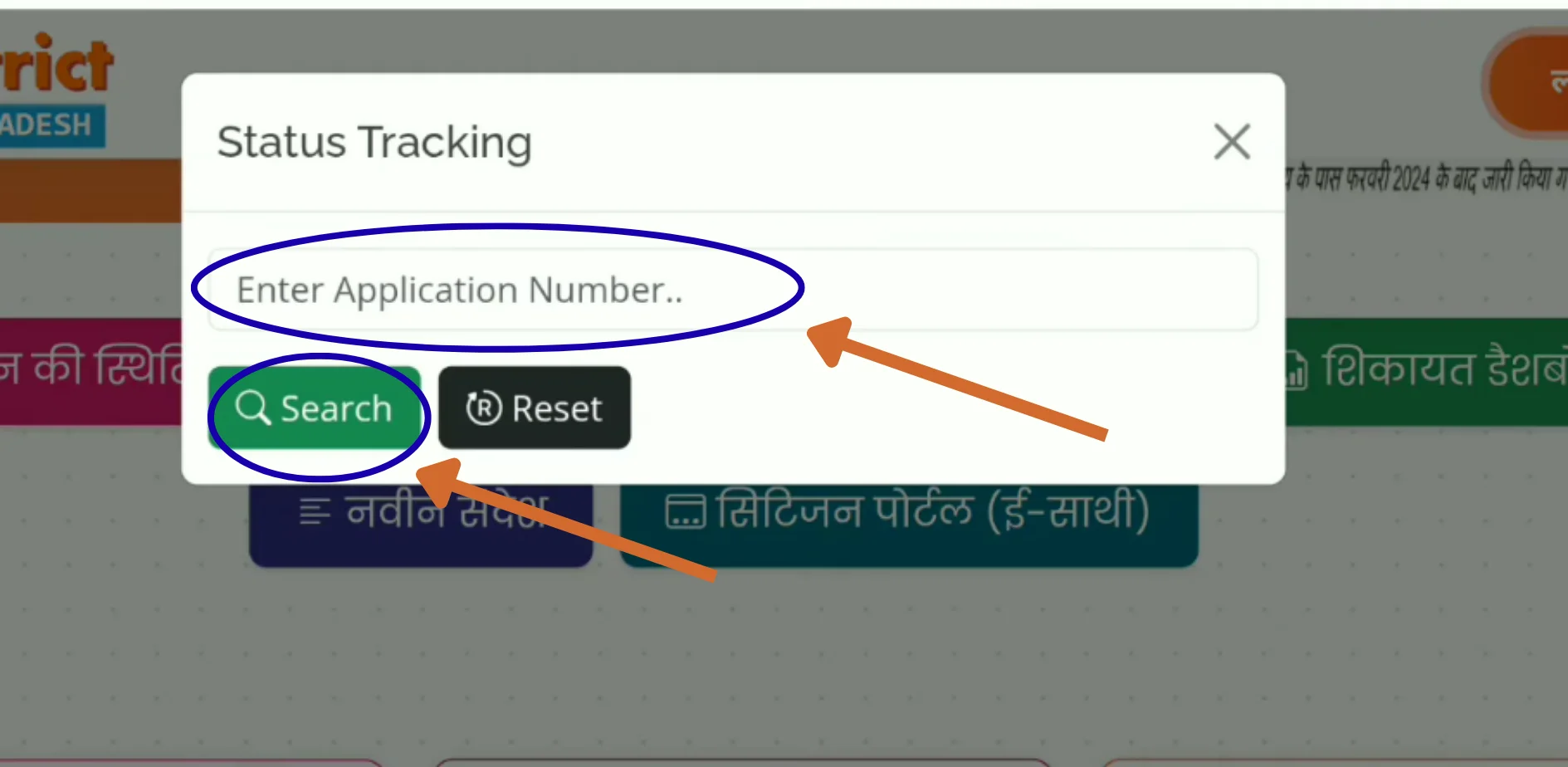
Enter captcha → Search
With login
esathi.up.gov.in → Login → Dashboard shows all applications with SRN, type, date, and status. Click any application for details including officer name.
What every status label means
| Status | Meaning | What to do |
|---|---|---|
| प्रेषित (Submitted) | Received by system | Wait — assignment to Lekhpal/RI happens in 1–2 days |
| सत्यापनाधीन (Under Verification) | With Lekhpal/Revenue Inspector for field check | Longest stage: 5–10 days. Ensure someone is at your address. |
| लेखपाल रिपोर्ट प्रतीक्षित | Lekhpal hasn't submitted verification report yet | Wait up to 15 days. Beyond that, escalate. |
| तहसीलदार को अग्रेषित | Field verification done, with Tehsildar for review | Good news. Review + signing takes 2–5 days. |
| स्वीकृत (Approved) | Approved. System generating signed PDF. | Wait 24–48 hours for "Certificate Generated." |
| प्रमाण पत्र जारी (Certificate Generated) | Ready to download. | Go to the Download section below. |
| अस्वीकृत (Rejected) | Rejected — check reason in eSathi dashboard. | Fix issue, reapply. No penalty. Common causes: blurry docs, name mismatch, missing self-declaration form. |
| संशोधनाधीन (Pending for Correction) | Minor issue found — correct and resubmit. | Login, read correction note, fix, resubmit. Same SRN. |
The verification chain — why applications get "stuck"
You submit → System assigns to Lekhpal (rural) or Revenue Inspector (urban) → Lekhpal does field verification (visits your area, checks income/caste/address — THIS is where most delays happen) → Submits report to Tehsildar → Tehsildar reviews + applies Digital Signature (DSC) → Certificate generated.
SRN vs Certificate Number — don't confuse them: SRN = tracking number from submission. Use on status check page. Certificate Number = printed on the final approved certificate. Used by universities, employers, courts for verification. Different numbers.
How to Download Your Certificate
Pre-requisite: Status must show "प्रमाण पत्र जारी" (Certificate Generated). If it shows "Approved" — wait 24–48 hours.
From eSathi
Login at esathi.up.gov.in
Click "Completed Applications" (पूर्ण आवेदन)
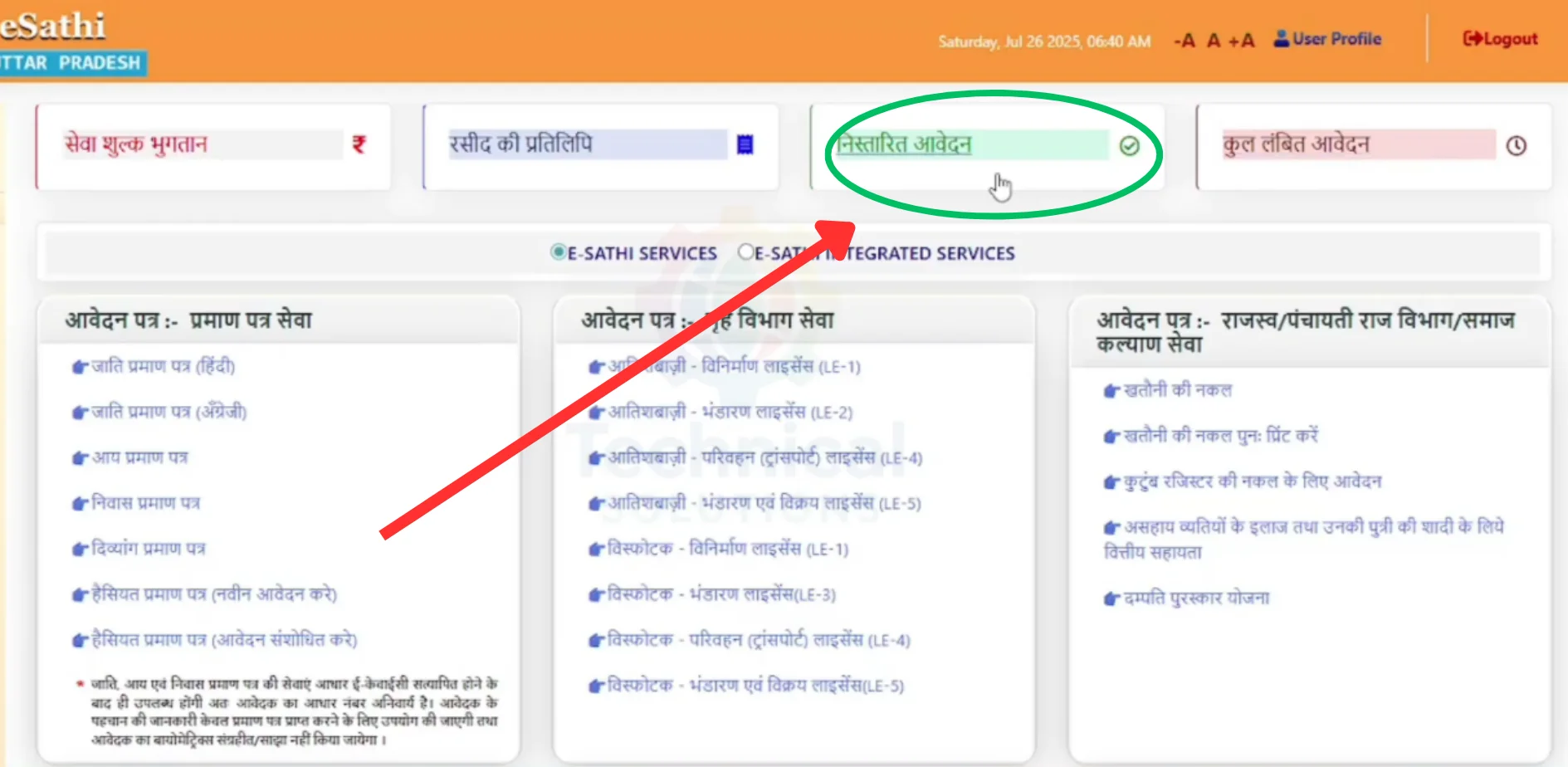
Click on your application name in the list — the application will open
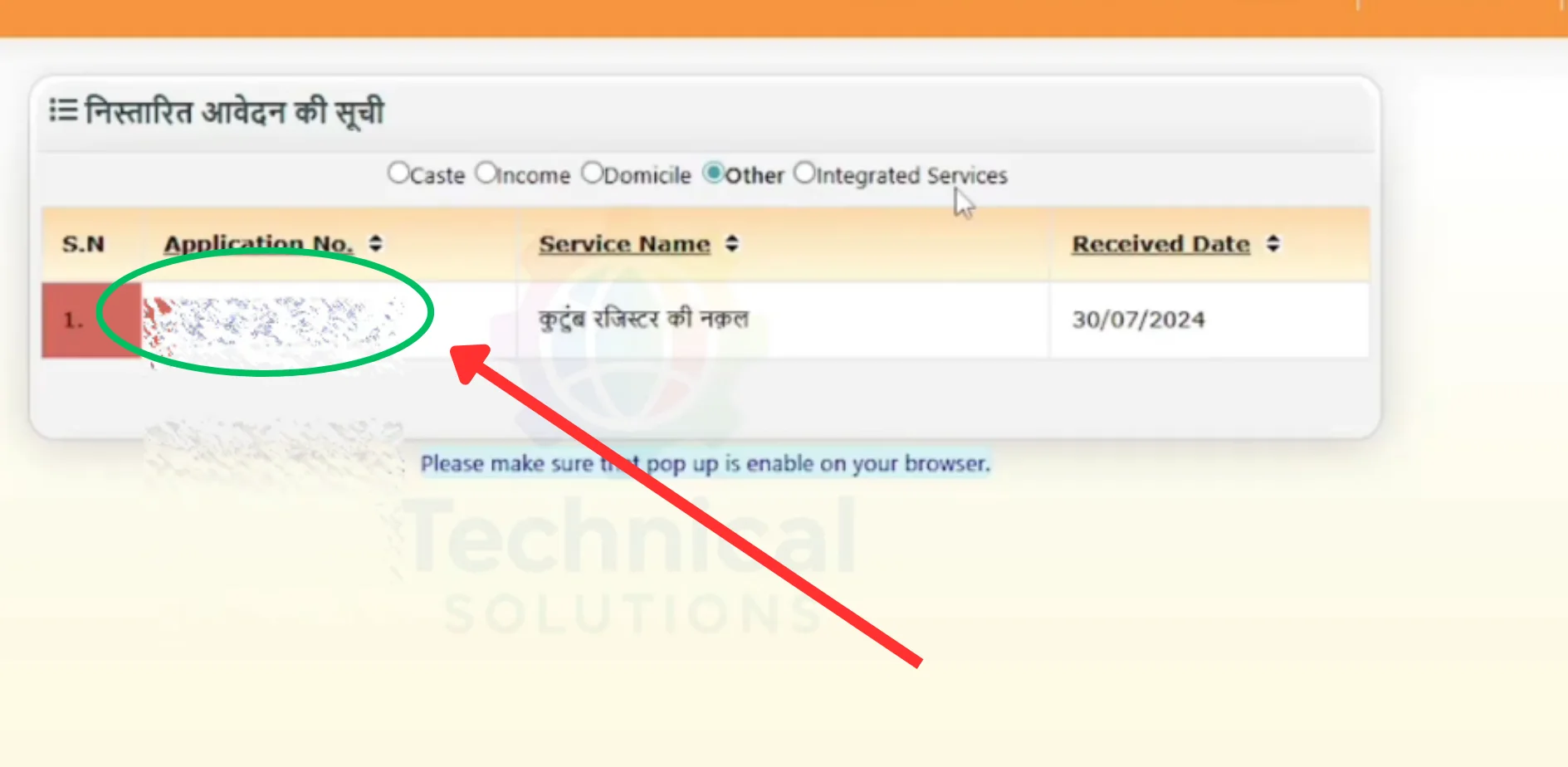
In the opened application, click the "Print" button → browser Print dialog opens → select "Save as PDF" and save
From DigiLocker
Login at digilocker.gov.in → Issued Documents → find your certificate. DigiLocker sync may take a few days after eSathi generation.
What you get
Digitally signed PDF with Certificate Number + QR code + Tehsildar/SDM's Digital Signature. This IS your official certificate — no separate physical version. Print as many copies as needed — all equally valid because the QR code and Certificate Number remain verifiable.
Legal validity
Under Section 5 of the IT Act, 2000, digitally signed certificates are legally equivalent to physically signed documents. Accepted across India — courts, universities, government offices, banks.
If applied through CSC
You still need an eSathi account to download yourself. Or go back to the CSC. Or access via DigiLocker.
Download not working?
Use Chrome → clear cache → disable ad-blockers → try incognito → try "Desktop site" mode on mobile. If PDF opens blank, delete and re-download with stable internet.
After download: Check every detail immediately — name, father's name, address. If anything is wrong, you cannot edit the PDF (it breaks the digital signature). Apply fresh with correct info. Save backup to Google Drive or email. Print 3–5 copies.
How to Verify Any eDistrict UP Certificate
Who uses this: Universities verifying caste certificates for admissions, recruitment boards verifying income/domicile for jobs, banks verifying death certificates for claims, courts verifying documents as evidence. You typically don't verify your own certificate — third parties do.
Method 1 — Certificate Number
Open edistrict.up.gov.in
Click "प्रमाण पत्र सत्यापन" (Certificate Verification)
Enter Certificate Number (from the issued certificate — NOT the SRN)
Captcha → Search
Portal shows applicant name, certificate type, issue date, signing officer. Compare with the certificate you hold.
Method 2 — QR Code (fastest)
Point phone camera at the QR code on the certificate → tap the link → verification page opens with details pre-loaded. Under 10 seconds.
No login needed. Anyone can verify.
"Signature invalid" in PDF reader?
Don't panic. Most PDF readers don't recognise Indian government Certifying Authorities by default. Open in Adobe Acrobat Reader → click signature → "Validate Signature." If it says valid, the certificate is genuine. The warning is because Indian CCA root certificates aren't in your PDF reader's trust store.
Verification fails?
Check you entered Certificate Number (not SRN). Check for typos. Try QR code instead. If portal consistently shows no results, the certificate may be fake — report to the issuing Tehsil office and edistrict@nic.in.
6 Common eDistrict UP Problems — Quick Fixes
1OTP not received
Check mobile network. Verify number matches Aadhaar. Wait 2–3 min cooldown. Check SMS spam folder. Try early morning during peak seasons (Jul–Sep). Disable DND temporarily.
2Document upload fails
Every file must be under 100KB, JPEG or PDF. Scan in black & white at 200 DPI. Use free online compressor. The self-declaration form must be JPEG, not PDF. See our self-declaration form page.
3Application stuck at "Under Verification" for weeks
Standard is 7–15 working days. Beyond 15 days: file grievance on portal (edistrict.up.gov.in → Login → Grievance/शिकायत). Call 0522-2304706 with SRN. Still stuck → use Janhit Guarantee rights below.
4Payment deducted but "Payment Pending"
Don't panic. Wait 24–48 hours for auto-reconciliation. If still pending, contact helpline with transaction ID and screenshot.
5Portal not loading / server error
Heavy traffic during scholarship (Jul–Sep) and exam seasons. Try 6–8 AM or after 10 PM. Use Chrome. Clear cache. Switch between Wi-Fi and mobile data.
6Application rejected
Login to eSathi, check rejection reason. Common causes: blurry scans, Aadhaar name mismatch, missing self-declaration form, wrong Rural/Urban selection, Lekhpal couldn't verify at address. Fix the specific issue, reapply — no penalty or limit.
Certificate Delayed? Your Legal Right Under Janhit Guarantee Act
The UP Janhit Guarantee Adhiniyam, 2011 (UP Act No. 3 of 2011) guarantees time-bound delivery of public services. It covers 382 services across 45 departments — most eDistrict revenue certificates fall under it.
What it gives you:
Prescribed timelines — 7–15 working days for most certificates
Right to First Appeal — if your certificate is not issued even after the prescribed deadline has passed, you can file a written appeal with the Additional District Magistrate (ADM) within 30 days. The ADM is legally bound under the Act to hear your case and pass an order within the prescribed timeframe.
Right to Second Appeal — within 60 days to the District Magistrate (DM), who has civil court powers
Officer penalties — non-compliance without valid reason can result in monetary penalties
How to use it:
Note your application date and prescribed timeline
Deadline passed → file grievance on portal (edistrict.up.gov.in → Login → Grievance)
Portal grievance unresolved in a week → visit DM office, submit written appeal citing Janhit Guarantee Adhiniyam 2011 with your SRN and application date
Appellate Authority must respond within the Act's prescribed timeframe
Critical during UP Scholarship deadlines, UPPSC/SSC exam document verification windows, and NEET state quota counselling deadlines.
Frequently Asked Questions
What is the URL for eDistrict UP citizen login?
esathi.up.gov.in — or click "Citizen Login (eSathi)" on edistrict.up.gov.in. The old URL edistrict.up.nic.in redirects automatically.
Is my Login ID the same as my mobile number?
No. Login ID is the 6–8 character username you created during registration. Use "Forgot Login ID" if you can't remember it.
How much does a certificate cost?
₹10–15 through eSathi self-service. Through CSC, ₹30 government fee plus ₹30–50 facilitation. Haisiyat certificate is ₹120.
How long does a certificate take?
7–15 working days for most certificates. Active officers process in 3–5 days. Delays common during scholarship season (Jul–Sep).
Are digital certificates legally valid?
Yes. Digitally signed under the IT Act, 2000. Accepted across India — courts, universities, government offices, banks. No physical attestation needed.
Is eDistrict UP and eSathi the same thing?
eDistrict is the backend system. eSathi is the citizen portal you log into. Same system, different names. When people say "eDistrict UP login," they mean eSathi login.
What if my application is rejected?
Check rejection reason in eSathi dashboard. Fix the issue. Reapply — no penalty or limit. Common causes: blurry documents, name mismatch with Aadhaar, missing self-declaration form. See our self-declaration form page.
Can I apply from outside UP?
Submit online from anywhere. Field verification happens at your stated UP address. You must have a valid UP address.
What if my certificate is delayed beyond the timeline?
File grievance on the portal. If unresolved, file First Appeal under Janhit Guarantee Act with the ADM within 30 days of deadline expiring.
Is the eSathi mobile app still available?
The Android app was removed from Google Play in August 2024. The web portal works fully on mobile browsers — use Chrome.
What is the difference between SRN and Certificate Number?
SRN is generated at submission for tracking. Certificate Number is on the final issued certificate for verification by third parties. Different numbers for different purposes.
Can I access my certificate through DigiLocker?
Yes. Certificates sync to DigiLocker (digilocker.gov.in) after generation. May take a few days. Institutions accepting DigiLocker treat these as pre-verified.
Is registration on eSathi free?
Yes. Creating an account is free. You pay only when submitting a specific certificate application.
What if my registered mobile number changed?
You can't reset password via OTP if you lost access to the old number. Call 0522-2304706 or email ceghelpdesk@gmail.com with your Login ID for manual recovery.
Official Contact Details
| Helpline | 0522-2304706 |
| Technical email | ceghelpdesk@gmail.com |
| Portal email | edistrict@nic.in |
| Official portal | edistrict.up.gov.in |
| Citizen portal | esathi.up.gov.in |
| CSC locator | locator.csccloud.in |
| DigiLocker | digilocker.gov.in |
| UP land records | upbhulekh.gov.in |
| NIC UP address | 9 Sarojini Naidu Marg, Yojana Bhawan, Lucknow – 226001 |
Note: Only edistrict.up.gov.in and esathi.up.gov.in are clickable links. All others mentioned as plain text references.